kdl language
Repeat / when / unless
Three block-shaped steps add minimal control flow without turning wflow into a scripting language. Each takes a body of inner steps. Nest them if you must.
repeat
Run inner steps N times.
repeat 3 {
    key Tab
    wait 100
}
That fires three Tab presses with 100ms between them. Useful for navigating fixed UI distances.
The count is a literal positive integer. There's no from-stdout variant; if you need a dynamic count, capture the number in a shell step and shell out for the loop too.
when
Run inner steps only if a predicate holds. The predicate runs once at the start of the block; the inner steps either all run or all skip.
when window="Firefox" {
    key ctrl+l
    type "https://wflows.io"
    key Return
}
Predicates (use exactly one per when):
window="Firefox", a window whose title containsFirefoxis currently present.file="~/.config/foo", the path exists. Leading~/expands against$HOME.env="VPN_UP", the env var is set and non-empty.env="EDITOR" equals="nvim", the env var is set and matches the given value exactly.
else
when and unless can take an else block that runs when the predicate flips the other way. The else block must be the last node inside the parent.
when window="Slack" {
    focus Slack
    key ctrl+k
    type "#standup"
    key Return

    else {
        shell "slack &"
        wait-window Slack timeout-ms=20000
        notify "launched Slack" body="re-run to use it"
    }
}
Empty else is fine, same as no else block. Steps after the else aren't allowed; the parser rejects them with a clear error.
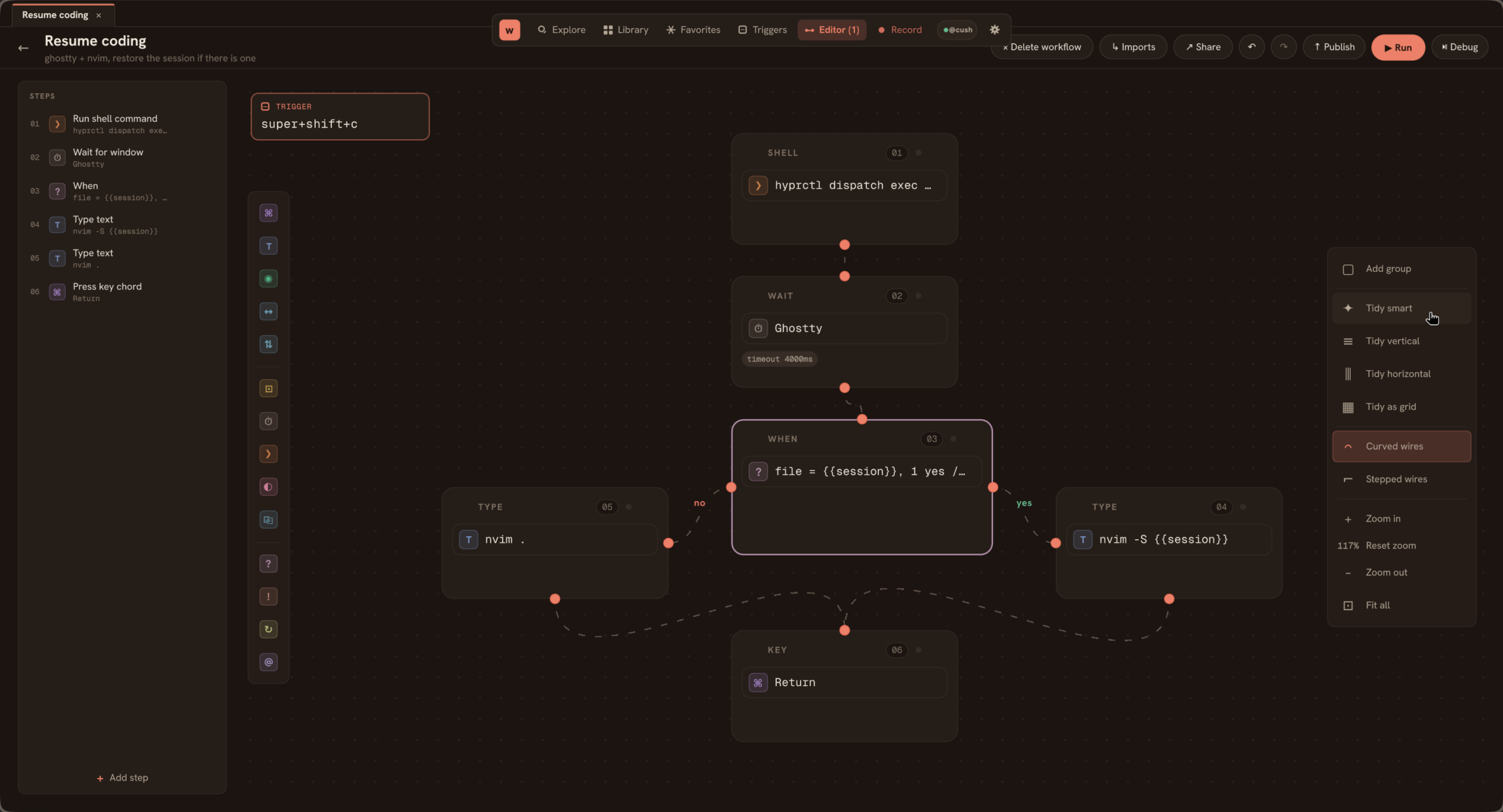
when file=... block on the canvas. The yes branch fans right, the else branch fans left, and wires rejoin at the next step after the conditional.unless
Inverse of when. Same predicates and same else support.
unless file="~/.cache/already-ran" {
    shell "expensive-thing"
    shell "touch ~/.cache/already-ran"
}
Nesting
Yes, but you'll regret it past two levels.
repeat 3 {
    when window="Editor" {
        key Down
        wait 50
    }
}
If your workflow needs more nesting than this, write a shell script and call it from a single shell step. wflow is for stitching; the shell handles the heavy logic.
Why this list is short
wflow doesn't have if value > 5, loops over arrays, or function definitions. By design. Once you reach for those, you've left wflow's "bind a chord to a sequence of OS-level actions" sweet spot and are writing a script. The pragmatic answer: shell out.